Place a rubber mat and enclose the blender to cut noise significantly.
I’ve worked on kitchen gear fixes for years, and I know how a loud blender can ruin a calm morning. This guide on how to make blender quieter walks you through causes, quick fixes, DIY soundproofing, maintenance tips, and buying choices. You’ll get clear steps that are safe, practical, and proven in real kitchens. Read on to lower blender noise without breaking the machine or your budget.

Why blenders are so loud
Blender noise comes from three main sources. The motor produces a steady mechanical hum. The blades create turbulent air and liquid noise at high speeds. The housing and counter amplify both vibration and noise.
Loose parts and worn couplers make things worse. A cracked jar, loose base, or failing bearings add rattles. The surface you place a blender on also matters: hard counters act like a speaker.
Knowing these causes helps you address the right item when learning how to make blender quieter. Fixing vibration is often more effective than trying to muffle sound alone.

Quick, no-tools fixes to make blender quieter
These simple fixes work fast. Try them before buying parts.
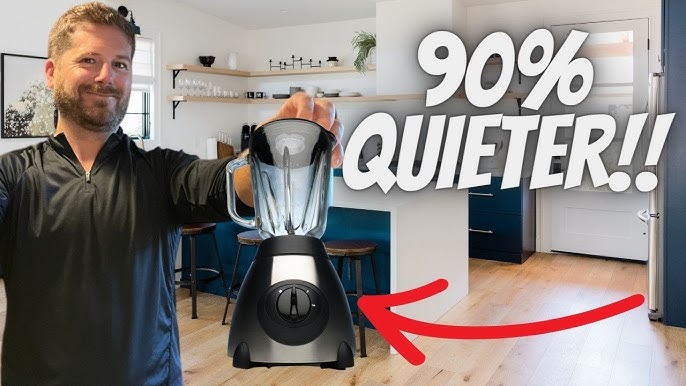
- Place a rubber mat under the blender. This cuts vibration transfer to the counter and reduces perceived loudness.
- Run at lower speeds. Start on low and ramp up only when needed to mix. Lower speeds make much less noise.
- Use a towel or silicone trivet under the base. This helps if you don’t have a rubber mat handy.
- Fill the jar correctly. Overfilling forces the motor to work harder and louder. Follow the jar’s max fill line.
- Secure the lid and jar. Tight lids reduce splatter and whistling. Tight jars stop rattles.
I often start with a rubber mat and speed control. In my experience, those two alone cut noise a lot and preserve motor life. They are the fastest way to learn how to make blender quieter at home.
DIY soundproofing and materials that work
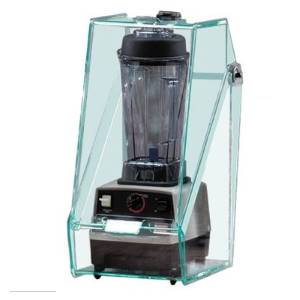
If you want bigger gains, try a simple sound box or damping add-ons. Follow safety rules to avoid motor overheating or blocking vents.
Step-by-step: build a basic sound box
- Choose a box size that fits your blender and leaves 2–3 inches of airflow space. Use plywood or MDF.
- Line the inside with acoustic foam or dense fabric. This absorbs mid and high frequencies from the jar and lid.
- Cut openings for power cord and pour spout. Keep vents to the side or back; don’t cover the motor air intake.
- Add a soft gasket where the lid meets the box top to reduce direct sound leakage.
- Test in short bursts to ensure motor doesn’t overheat. Stop if the motor feels hot or smells odd.
Other useful materials and tweaks
- Damping ring: place a silicone or rubber gasket between jar and base to cut resonance.
- Isolation feet: use small rubber feet under the blender feet for extra decoupling.
- Mass loading: add a dense top layer (like a heavyweight cutting board) to the box lid to block more sound.
- Soundproofing mat under base: high-density neoprene is best.
Safety and limitations
- Never seal the motor vents. Restricted airflow can overheat the motor.
- Avoid covering the blender for long runs. Use soundproofing only during short blending tasks.
- Some warranty agreements may be voided by DIY modifications. Check before you alter the base or seals.
These DIY steps are practical if you want to learn how to make blender quieter without buying a new unit. They work best when combined with routine maintenance.
PAA-style questions (short answers)
How much noise reduction can a sound box provide?
A well-built box can cut perceived noise by 6–15 dB depending on materials and openings. Proper sealing and dense layers help the most.
Is it safe to cover my blender to reduce noise?
Short runs in a ventilated sound box are usually safe, but do not block motor vents or use for prolonged high-power blending. Always monitor motor heat.
Can vibration pads really help?
Yes. Vibration pads reduce structure-borne noise and make the blender seem much quieter, especially on hard counters.
Maintenance and repair tips that lower noise long-term
Noise often signals wear. Regular checks keep your blender quieter and last longer.
- Inspect the coupler and drive socket. Replace if it shows wear or wobble.
- Check blades and jar for cracks. Damaged jars vibrate more and create noise.
- Lubricate or replace bearings if the motor makes grinding sounds. Only do this if the model supports it.
- Tighten screws and fasteners. Loose housing parts rattle under load.
- Clean the base and vents. Dirt and debris can change airflow and raise noise.
A few years ago I rebuilt a blender coupler and replaced the drive ring. The unit felt quieter and more responsive after repairs. That saved me the cost of a new machine and taught me how to make blender quieter by fixing the root cause.

Choosing a quiet blender or quieter alternatives
If fixes don’t help, consider a quieter model or a different tool.
What to look for in a quiet blender
- Lower decibel ratings listed in product specs. Look for models around 70–80 dB or less.
- Brushless motors. They often run smoother and quieter than brushed types.
- Rubber-mounted motor housings or anti-vibration feet. These reduce transmitted noise.
- Variable speed control. Gentle starts and low speeds cut noise.
Alternative tools to reduce loud blending
- Immersion blender for small tasks. These are usually quieter.
- Food processor at lower speeds for chopping. They can be less noisy for some jobs.
- Manual tools like a whisk or hand masher for very small jobs.
When shopping, read user reviews that mention noise and vibration. Testing in store with permission can also help. These choices help you decide how to make blender quieter by design.
Frequently Asked Questions of how to make blender quieter
What is the easiest way to make a blender quieter?
Place a rubber mat under the blender and run it at lower speeds. These two steps often produce the largest and safest immediate drop in noise.
Can replacing the blades make the blender quieter?
Yes. Bent or dull blades force the motor to work harder and vibrate more. Replacing them can restore smooth operation and cut noise.
Will putting the blender in a cabinet reduce noise?
A closed cabinet might amplify low frequencies or trap heat. Use a ventilated box or leave doors slightly open and monitor motor temperature.
Are decibel meters useful for testing noise?
Yes. A simple smartphone decibel app helps compare changes after fixes. Use the same position and distance for consistent results.
Is it safe to add soundproof foam inside the blender base?
No. Do not add foam inside the motor housing. Only add foam to an external, ventilated sound box and keep vents clear.
Conclusion
You can make your blender quieter with smart fixes, maintenance, or a new model. Start with simple steps like a rubber mat, lower speeds, and tightened parts. If you want more reduction, build a ventilated sound box or replace worn parts. Be mindful of motor cooling and safety when you modify anything.
Try one tip this week and listen for the change. Share what works for you or ask questions below — I’d love to hear your results and help troubleshoot further.