Most blenders fail from motor burnout, electrical faults, or jammed blades from misuse.
As an appliance repairer with years of hands-on experience, I will walk you through what causes a blender to stop working, how to diagnose common failures, and how to fix or avoid them. This guide combines practical troubleshooting steps, clear explanations, and real-life tips so you can get your blender back to work or decide when to call a pro.

Common causes: What causes a blender to stop working
Blenders stop working for a few clear reasons. The top causes are electrical failures, mechanical wear, and user-related problems like overloading. Knowing these categories helps you find the root issue fast and safely.
Common causes include:
- Motor burnout. Motors wear out when overloaded or run too long.
- Electrical faults. Frayed cords, bad outlets, or blown fuses can cut power.
- Jammed blades or bearings. Food or ice can lock the blade assembly.
- Worn couplings and gears. Plastic parts can strip or crack with age.
- Thermal protection trips. Many blenders have safety cutoffs that stop the motor.
What causes a blender to stop working often mixes several issues at once. For example, repeated overload can damage the coupling and burn the motor. Spotting the first sign early can save you from a full replacement.
Electrical issues and power problems
Electrical problems are an easy place to start when wondering what causes a blender to stop working. Check these items first because they are simple to test and often the cause.
Key checks:
- Power source. Try a different outlet or plug in another appliance to test the outlet.
- Power cord and plug. Look for cuts, frays, or bent prongs that interrupt current.
- Internal fuses and thermal cutoffs. Some blenders have replaceable fuses or thermal switches that trip when overheated.
- Circuit breaker. A tripped breaker or GFCI outlet can stop power to the blender.
Fix tips:
- Replace damaged power cords only with manufacturer-approved parts.
- Reset tripped breakers and allow the motor to cool before restarting.
- If internal fuses are blown repeatedly, avoid replacing them repeatedly — that signals a deeper electrical issue.

Mechanical failures: blades, couplings, and bearings
Mechanical issues are another frequent answer to what causes a blender to stop working. Parts wear out from friction, food debris, or impact.
Common mechanical faults:
- Dull or bent blades. Blades become less effective and can unbalance the motor.
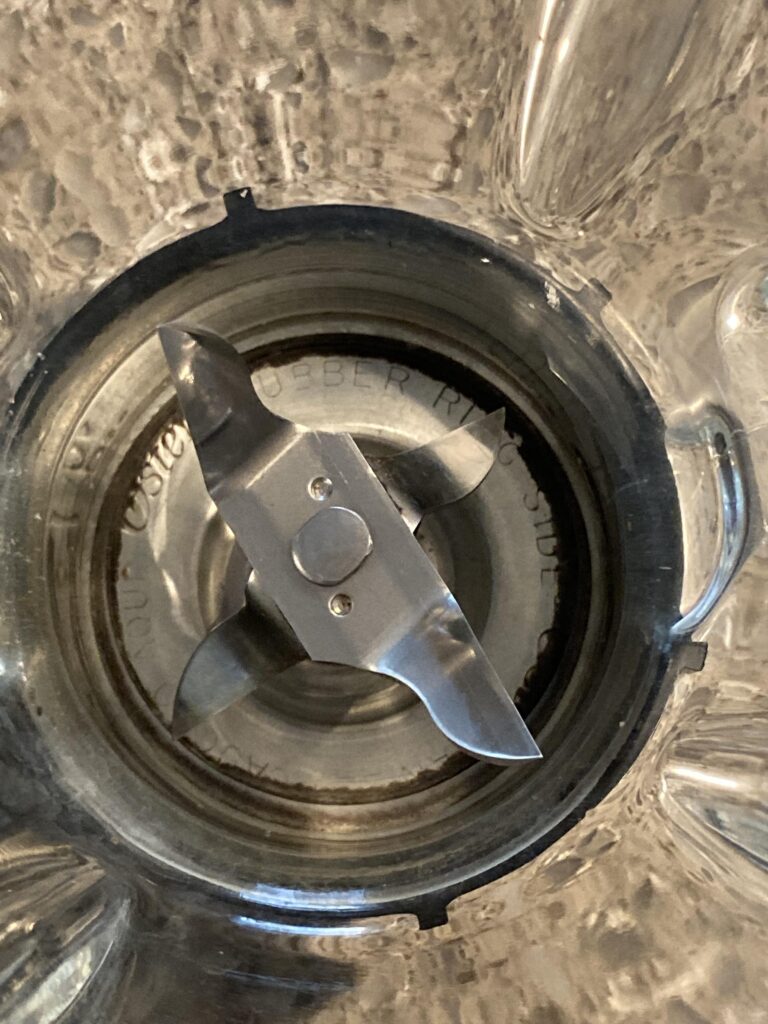
- Stripped or cracked couplings. The drive coupling can fail, leaving the motor running but blades not turning.
- Worn bearings. Noisy or stiff rotation suggests bearing failure.
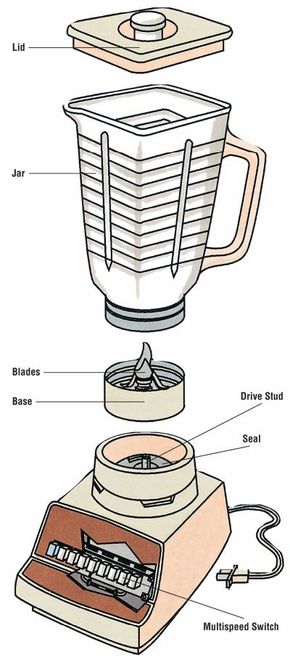
- Jar and base damage. Cracked jars or warped bases can prevent a secure fit and stop operation.
Personal note: I once fixed a blender that powered on but wouldn’t blend. The motor hummed while the blade stayed still. A cracked plastic coupling was the culprit. Replacing the inexpensive coupling restored full function.
Repair tips:
- Tighten loose assemblies and replace worn couplings.
- Replace blades if they are bent or badly worn.
- For sealed bearings, replacement of the blade assembly or base is usually needed.

Overuse, maintenance, and user errors
User habits play a big role in what causes a blender to stop working. Small habits lead to major failures over time.
Common mistakes:
- Overfilling the jar. Liquids and solids should stay well below the rim.
- Blending hard ice or frozen blocks without enough liquid. This jams blades and strains the motor.
- Running the blender too long without breaks. Continuous use can overheat the motor and trip thermal protectors.
- Neglecting cleaning. Food trapped under the blade or in vents can cause corrosion or block cooling.
Preventive maintenance:
- Run the blender in short bursts and use pulse mode.
- Add liquid before adding heavy solids or ice.
- Clean the base, vents, gasket, and blade assembly after each use.
- Periodically inspect seals and replace worn parts.
What causes a blender to stop working is often something preventable. Regular care can double or triple the usable life of a blender.

Troubleshooting steps: Diagnose and fix at home
Follow these safe, step-by-step checks to find what causes a blender to stop working. Work slowly and unplug the blender before any inspection.
Step-by-step guide:
- Confirm power. Plug another device into the same outlet, or plug the blender into a known-good outlet.
- Inspect the cord and plug. Look for visible damage and test with a different cord if possible.
- Test the jar and lid. Ensure the jar sits fully on the base and lid safety switches are engaged.
- Try an empty run. Run the blender briefly without load to see if the motor spins freely.
- Listen for humming. If the motor hums but doesn't spin, the coupling or blades may be jammed.
- Let it cool. If the unit was used heavily, let it cool 30–60 minutes to reset thermal protection.
- Disassemble carefully. Remove the jar, base, and blade assembly to check for trapped debris or stripped parts.
- Replace small parts. If you find a cracked coupling or worn blades, replace those parts with OEM or compatible items.
PAA-style questions:
What causes a blender to stop working after a few seconds?
- A common cause is thermal cutoff or motor overload; the unit may overheat and shut down for safety.
Why does my blender hum but not spin?
- Humming with no spin usually means the motor is receiving power but the blade coupling or bearings are jammed or stripped.
Can I fix a blender that stopped working myself?
- Many fixes are simple, like replacing a coupling or fuse; complex motor or electrical repairs should go to a professional.

When to repair, replace, or call a professional
Knowing when to DIY and when to hire a pro helps avoid damage and keeps you safe. Consider the following when deciding what causes a blender to stop working beyond simple issues.
Repair at home when:
- The problem is a jammed blade, stripped coupling, or easy-to-replace fuse.
- Replacement parts are inexpensive and available.
Call a professional when:
- The motor smells like burning or shows visible electrical damage.
- Internal wiring or sealed motor repairs are needed.
- The blender is under warranty—avoid opening the unit and voiding coverage.
Replace the blender when:
- Repair costs approach the price of a new blender.
- The motor is severely burnt or the unit has multiple failing components.
- Safety features are compromised or parts are obsolete.
Costs vary, but small part fixes are usually inexpensive. Major motor repairs or replacements often make a new unit the smarter choice.
Frequently Asked Questions of What causes a blender to stop working
Why does my blender stop working suddenly?
A sudden stop often means a tripped thermal cutoff, overloaded motor, or an electrical interruption like a blown fuse or tripped breaker.
How can I tell if the motor is burned out?
If the motor doesn’t start, smells of burning, or has visible damage, it is likely burned out. A professional test can confirm internal winding failure.
Is it safe to run a blender after it overheats?
No. Allow the blender to cool fully and inspect for damage before restarting. Repeated overheating can permanently damage the motor.
Can a jammed blade cause electrical damage?
Yes. A jammed blade forces the motor to work harder, which can overheat and stress electrical components, potentially causing failure.
How often should I replace blender parts like blades and gaskets?
Inspect parts every few months if you use the blender often. Replace blades and gaskets as soon as you see wear, leaks, or reduced performance.
Conclusion
You now know the main reasons what causes a blender to stop working: electrical faults, mechanical wear, and user-related issues. Use the troubleshooting steps here to diagnose common problems and follow simple maintenance to avoid future failures. If you spot burning smells, persistent electrical faults, or major motor damage, get professional help or consider replacing the unit.
Take action today: inspect your blender for loose parts and clean it after the next use. If this article helped, leave a comment below, subscribe for more appliance tips, or share your blender repair story.