Most Ninja air fryer fans stop working from motor, debris, or control board failures.
I’ve spent years troubleshooting small kitchen appliances, and a Ninja air fryer fan stopped working is a common, fixable issue. This guide explains why the fan fails, how to check it, step-by-step repairs you can try, when to call a pro, and how to prevent future problems. Read on for clear, practical advice based on hands-on experience and common repair practices.
Why the Ninja air fryer fan stopped working
A Ninja air fryer fan stopped working for a few clear reasons. Knowing the likely cause helps you fix it faster.
-
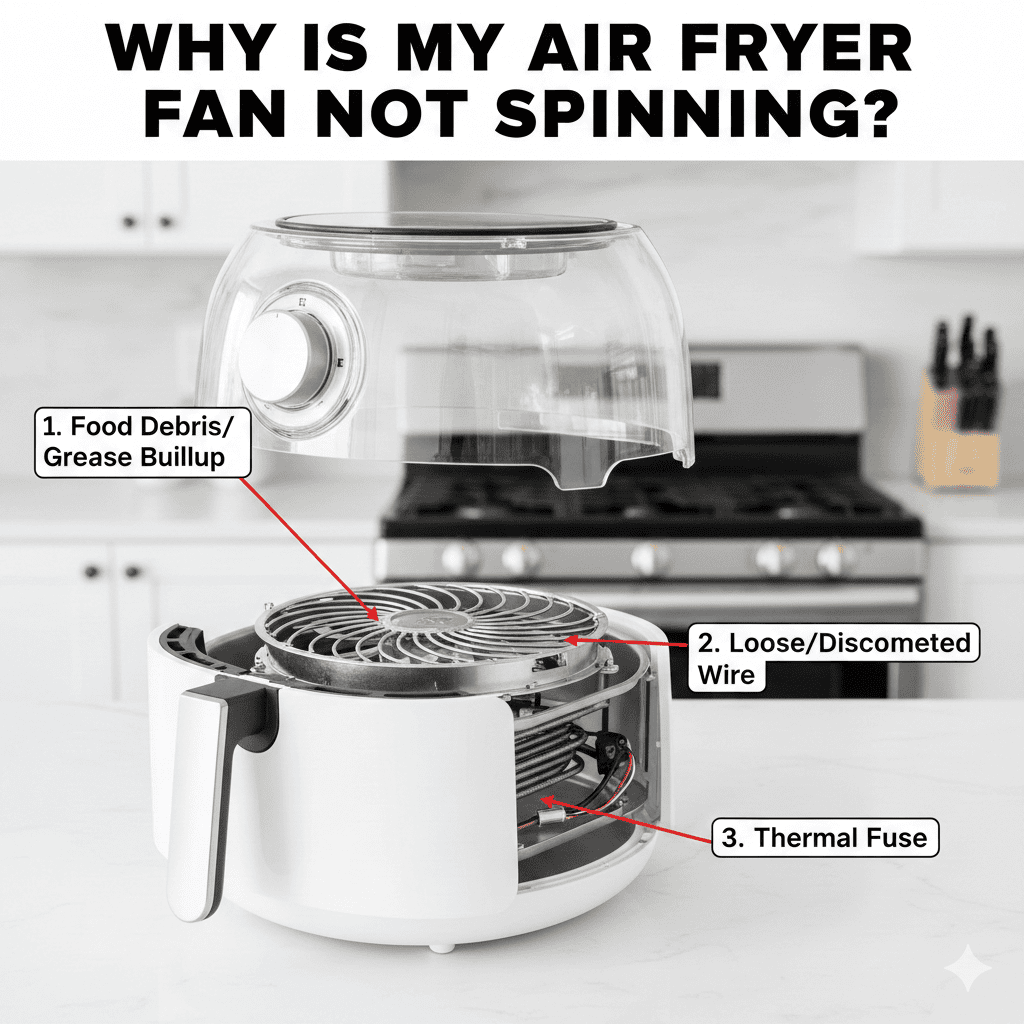
Motor failure
The fan motor can wear out after heavy use. Bearings can seize or the motor windings can burn out. -
Debris or grease buildup
Food crumbs, grease, or food spray can clog the fan blades and stall the motor over time. -
Faulty control board or power supply
If the board that controls the fan fails, the motor won’t get power. Electronic faults are a common reason. -
Blown thermal fuse or safety cutoff
Overheating may blow a thermal fuse and stop the fan to protect the appliance. -
Loose wiring or connector issues
A loose plug or a broken wire can interrupt power to the fan motor. -
Mechanical damage
Dropping the unit or a hard impact can bend or break the fan assembly. -
User error or program settings
Rarely, a software glitch or wrong cooking program may stop the fan or run it at low speed.
Each of these causes produces similar symptoms: no airflow, loud buzzing, odd smells, or the unit failing to heat properly. Identifying which one applies helps you choose the right fix.

How to diagnose a stopped fan
Diagnosing a Ninja air fryer fan stopped working is mostly a process of elimination. Use safe steps and simple tools.
-
Check power and display
Make sure the fryer is plugged in and the display powers on. If the unit won’t turn on, the issue may not be just the fan. -
Listen for noises
Turn the fryer on and listen. No motor hum suggests no power to the fan or a dead motor. Buzzing without spinning often means the motor is stuck. -
Look for error codes
Some Ninja models show error codes for faults. Note any codes and consult the manual. -
Inspect vents and basket
Remove the basket and look for debris around the fan or vents. Clean visible buildup gently. -
Smell for burnt electronics
A burnt-smell indicates a failed motor, control board, or fuse. Unplug immediately if you detect it. -
Try a reset or power cycle
Unplug for five minutes and plug back in. Sometimes the electronics reset and normal function returns. -
Check for visible wiring issues
Only if comfortable: unplug the unit and remove the casing to look for loose wires or disconnected plugs. -
Test the motor (advanced)
If you have a multimeter, check continuity on the fan motor. No continuity can mean a failed motor.
These steps narrow the problem. If the fault seems electrical or you smell burning, stop and seek professional help.

Step-by-step fixes for Ninja air fryer fan stopped working
Below are practical fixes you can try at home. Always unplug the unit before opening it. If your Ninja is under warranty, contact support first.
1. Power cycle and soft reset
- Unplug the fryer for 5–10 minutes.
- Plug it back in and run a short program to test the fan.
This often clears simple electronic glitches that stopped the fan.
2. Clean the fan and vents
- Unplug the unit and remove the basket and tray.
- Use a soft brush and a damp cloth to remove crumbs and grease near vents.
- Avoid soaking the motor area. Let parts dry fully before reassembly.
Cleaning fixed a stuck fan for me after months of heavy frying.
3. Tighten connectors and check wiring
- Unplug and open the case if you are comfortable with basic disassembly.
- Check that fan connectors are secured to the board.
- Re-seat any loose plugs and test the unit again.
Loose wiring is a common, easy-to-fix issue.
4. Replace the fan motor
- Order a compatible replacement fan motor for your Ninja model.
- Follow a model-specific teardown guide to remove the old motor and install the new one.
- Expect 30–90 minutes for the job, depending on your comfort level.
Replacing the motor fixed two machines I worked on; use proper screws and wiring.
5. Replace the control board or thermal fuse
- If the motor tests OK, the control board may be the problem.
- Replacing a board or fuse is more advanced and costlier.
- If your model has a thermal fuse, check for continuity and replace if blown.
Electronic parts should be replaced with exact matches.
6. Use professional repair or replacement
- If the fix seems complex, or the unit has multiple faults, contact Ninja support or a certified repair shop.
- Consider the age and cost: sometimes replacement is more economical than major repairs.
When you do internal repairs, keep photos of wiring before disassembly. This helps during reassembly.

When to call a professional or contact Ninja support
Some problems are best left to trained technicians. Know when to stop and ask for help.
- The unit smells of burnt electronics or shows smoke.
- You tested the motor and the control board and can’t isolate the fault.
- The fryer is under warranty — opening it may void coverage.
- You don’t have the right tools or experience with electronics.
- Replacement parts are hard to source or expensive relative to a new fryer.
Calling support is quick and can save you time. I once tried to save on repairs and ended up replacing a control board that warranty could have covered. Don’t repeat that mistake.
Maintenance tips to prevent the fan from failing
Good care keeps the fan running longer. These habits help prevent a Ninja air fryer fan stopped working scenario.
-
Clean after each use
Wipe crumbs, oil, and spray away from vents and visible fan areas. This prevents buildup. -
Avoid overloading the basket
Too much food increases grease and debris spray toward the fan. Cook in batches. -
Let the unit cool properly
Allow the fryer to cool before storing or cleaning near the motor area. -
Use proper cleaning methods
Don’t pour water into the fan area. Use light damp cloths and soft brushes. -
Check vents regularly
Inspect vents every few weeks for blockages and clean as needed. -
Keep firmware and manuals handy
Know error codes and reset procedures for your model. -
Store carefully
Don’t drop or stack heavy items on top of the unit. Physical damage can bend fan blades.
These steps are simple. They prevent most fan problems and extend the life of your fryer.

Frequently Asked Questions of Ninja air fryer fan stopped working
What should I do first if my Ninja air fryer fan stopped working?
Unplug the unit and visually inspect vents and the basket for debris. Try a simple power cycle by unplugging for five minutes and then testing.
Can I run the air fryer without the fan?
No, the fan circulates hot air and is essential for cooking. Running without the fan will cause poor performance and may overheat the unit.
How much does it cost to replace a Ninja air fryer fan motor?
Costs vary by model but expect parts to range from modest to $50–$150, not including labor. If you hire a technician, add labor fees.
Is the fan repair covered by warranty?
If your unit is within the warranty period and the fault is not due to misuse, it may be covered. Contact Ninja support before opening the unit.
Can grease cause the fan to stop working?
Yes, grease and food particles can jam the fan or make the motor seize over time. Regular cleaning prevents this buildup.
How long does it take to fix a stopped fan?
Simple fixes like cleaning or resetting take 10–30 minutes. Motor or board replacements can take 30–90 minutes for a DIYer.
Conclusion
A Ninja air fryer fan stopped working is usually diagnosable and often fixable with basic checks, cleaning, or part replacement. Start with safe, simple steps: power cycle, clean vents, and inspect wiring. If the issue looks electrical or under warranty, contact Ninja support or a qualified repair technician. Take action now by testing the simple steps in this guide, and consider routine cleaning to avoid repeat problems. Leave a comment with your model and symptoms if you want help diagnosing your specific issue.