Plug in the base, secure the pitcher or cup, lock the lid, then choose a speed or Pulse.
I’ve used and tested many Ninja blenders over the years, so I know how to turn on a Ninja blender quickly and safely. This guide shows clear, step-by-step instructions, practical tips, and troubleshooting so you can start blending with confidence. You’ll learn how to turn on a Ninja blender, how the controls work, safety checks, and what to do when it won’t start. Read on and you’ll be blending in no time.
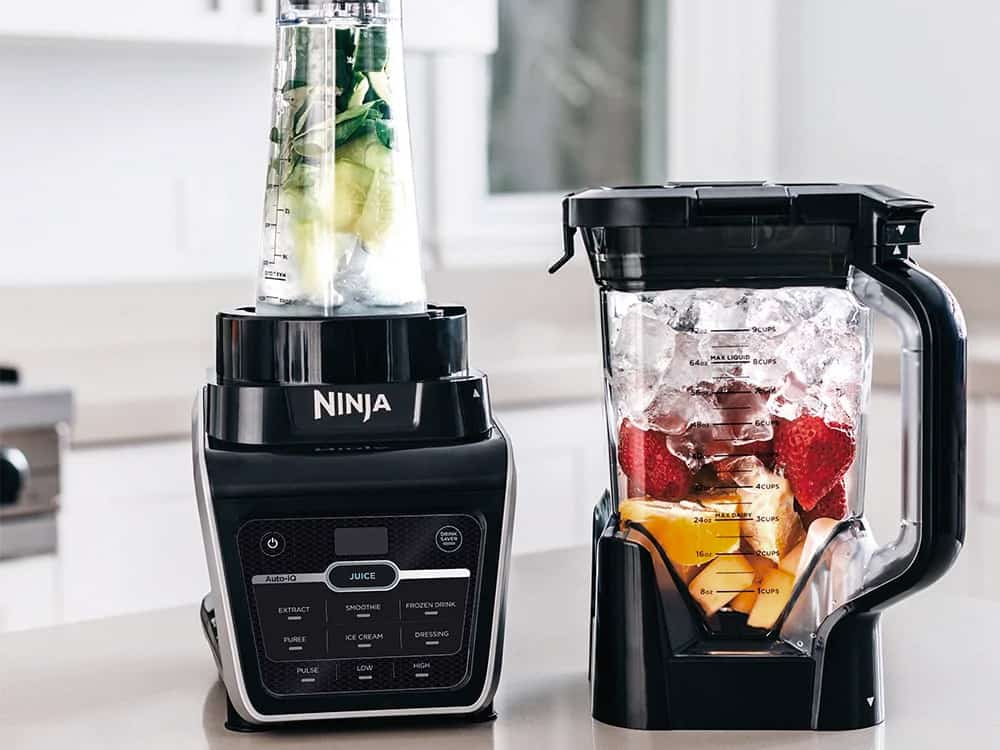
Quick steps: how to turn on a Ninja blender
Follow these short steps when you want to know how to turn on a Ninja blender fast. Each step is simple and safe.
- Place the power base on a flat, dry surface.
- Put the pitcher or single-serve cup on the base and twist to lock.
- Add ingredients and secure the lid or blade assembly.
- Plug the blender into a grounded outlet.
- Select a setting or press Pulse to start blending.
- Stop, unplug, and unlock the pitcher when finished.
These steps describe how to turn on a Ninja blender for most standard models. If your model has Auto-iQ or special presets, use the preset buttons after the base is plugged in.

Detailed step-by-step guide: how to turn on a Ninja blender
This section expands each step so you won’t miss anything. I share what I learned testing multiple Ninja models.
Step 1: Inspect the unit
- Check the base for cracks or loose parts.
- Make sure the pitcher, cup, and lid are clean and dry.
- Confirm the blade assembly is correctly seated.
Step 2: Assemble correctly
- Place the blade in the pitcher or cup if it’s removable.
- Align the tabs and twist the pitcher to lock on the base.
- For single-serve cups, thread the blade assembly on tightly.
Step 3: Plug in the blender
- Use a grounded outlet.
- Avoid extension cords when possible.
- Confirm the outlet has power by testing a small appliance first.
Step 4: Choose your setting
- Press Low, Medium, or High for manual control.
- Use Pulse for short bursts of power.
- For Auto-iQ models, press a preset like Smoothie or Crush.
Step 5: Start blending and monitor
- Hold the lid while pulsing for tough ingredients.
- Stop and stir if needed.
- When done, unplug before removing the pitcher.
When you repeat these steps, turning on a Ninja blender becomes second nature. I recommend practicing with water the first time to get a feel for the controls and noise level.
Understanding controls and common modes
Knowing the buttons helps you turn on a Ninja blender with the right setting for the job.
- Manual speed buttons: Let you pick low, medium, or high speeds.
- Pulse button: Gives short, powerful bursts. Great for chopping and controlling texture.
- Preset/Auto-iQ: Runs a program that mixes timings and speeds automatically.
- Start/Stop: Some models use a simple start/stop button instead of labeled speeds.
If you’re unsure which button to press, start with Pulse. It’s safe and gives you more control when learning how to turn on a Ninja blender.

Safety checks before you turn it on
Safety keeps your kitchen accident-free. Always do these checks before you turn on a Ninja blender.
- Verify the lid is locked and the safety tabs are engaged.
- Ensure there are no cracks in plastic parts or chips in blades.
- Keep hands and utensils away from blades while plugged in.
- Do not operate with an overfilled pitcher; leave room to blend.
A common mistake is skipping the lid check. I once forgot to lock the lid and had a mess to clean up. That taught me to double-check every time I turn on a Ninja blender.
Troubleshooting: what to do if it won’t turn on
If you follow the steps and your Ninja won’t start, try these fixes. These are the most common issues I’ve solved.
- No power: Confirm the outlet works by plugging in another device.
- Not assembled properly: Unplug, re-seat the pitcher or cup, and lock it again.
- Overload protection: Allow the motor to cool for 15–30 minutes if it shut off.
- Faulty cord or base: Inspect the cord for damage. If the base is damaged, stop using it and contact support.
If none of these fixes work, contact customer service or a certified repair tech. Don’t try to open the motor base yourself. That can void the warranty and be unsafe.
Maintenance tips to keep turning it on easily
Regular care helps your Ninja keep working and makes turning it on easy every time.
- Clean blades and pitcher after each use.
- Dry parts before storing to prevent odors.
- Check and tighten removable blade assemblies when needed.
- Replace worn gaskets or lids to keep seals tight.
I clean my Ninja after every smoothie. It keeps performance steady and prevents clogs that can stop the unit from starting.
Real-life tips and mistakes to avoid
Here are short insider tips from my experience. They make learning how to turn on a Ninja blender faster and safer.
- Start with low speed when blending hot liquids to prevent splatter.
- Use the Pulse button to break down ice before running high speed.
- Never fill above the max fill line. Overfilling often trips the motor protection.
- Store lids and blades together so you don’t struggle to assemble when hungry.
These small habits save time and reduce wear on the motor when you turn on a Ninja blender.

Related uses and handy applications
Knowing how to turn on a Ninja blender opens many kitchen tasks.
- Smoothies and shakes: Use presets or high speed.
- Sauces and purees: Use low speed and pulse for control.
- Grinding coffee or spices: Use short bursts and small amounts.
- Crushing ice: Add a little water and use pulse first.
Using the right method increases life span and gives better results each time you turn on a Ninja blender.

Frequently Asked Questions of how to turn on a ninja blender
How do I safely start a Ninja blender for the first time?
Assemble the pitcher, lock the lid, and plug into a grounded outlet. Start with Pulse or Low speed to test the unit and listen for unusual noises.
Why won’t my Ninja blender turn on after I press a button?
Check the power source and the assembly lock. The motor may have tripped its thermal protection; unplug and let it cool for 15–30 minutes.
Can I use the Pulse function to blend everything?
Pulse is great for control and crushing ice. For long blends or smooth textures, switch to a dedicated speed or preset after pulsing.
Is it safe to blend hot liquids in a Ninja?
Yes, on many models. Use low speed and remove the center vent cap if your lid has one. Start slowly to avoid splatter.
What should I do if the blade jar won’t lock?
Unplug and re-seat the blade and pitcher, then realign the tabs and twist until it locks. If it still won’t lock, check for debris or damaged threads.
How often should I check seals and gaskets?
Check them every month if you use the blender regularly. Replace any cracked or worn parts to maintain a tight seal and safe operation.
Conclusion
You now have clear steps and tips on how to turn on a Ninja blender safely and effectively. Start by checking parts, assemble securely, plug in, and choose Pulse or a speed. Practice a few times with water to build confidence. Take action today: try a simple smoothie or test the Pulse mode to get comfortable. If this guide helped, share your experience or ask a question in the comments to keep learning.